Obby: Push Rock For Brainrots Builds Progress One Boulder at a Time
Obby: Push Rock For Brainrots is a Roblox-style progression game where strength determines which giant stones you can move. Each cleared rock opens access to a higher area containing more valuable Brainrots, turning physical upgrades into new collecting opportunities. Pick up a creature, escape its guardian, and carry it back to your base so it can begin generating money.
That income funds strength, speed, and extra base slots, creating a loop where every successful delivery makes the next climb easier. Surprise boxes, superpowers, and temporary guardian freezes add useful shortcuts, but steady upgrades remain the foundation of long-term progress.
Train Enough Strength Before Pushing Higher
A blocked entrance is a signal to improve, not to keep wasting time against the same stone. Spend early income on strength until the next boulder moves reliably, then add speed so trips between the guarded area and your base become safer. Unlocking a new level matters because its Brainrots can produce more money than the starter creatures.
Plan the Theft and the Route Home
Before picking up a Brainrot, rotate the camera and locate the guardian. Choose a clear path back, wait for the monster to move away, and avoid getting trapped against scenery while carrying the creature.
- Push gate-blocking rocks to reach higher-value collection zones.
- Use earnings to balance strength, movement speed, and base capacity.
- Expand base slots before collecting more Brainrots than you can place.
- Save the guardian freeze for a valuable target or difficult escape route.
Surprise boxes may provide a useful Brainrot, but they should support rather than replace the main progression loop. Deposit each strong find quickly, then let its passive income finance the next upgrade. If a guardian catches you, study its patrol on the next attempt instead of repeating the same direct route.
Keyboard and Mouse Controls
- WASD: Move.
- Spacebar: Jump.
- Right Mouse Button: Rotate the camera.
- Mouse wheel: Zoom in or out.
- Left Mouse Button: Use general interactions.
- E: Pick up or place a Brainrot.
More Brainrot Progression Games














 Basket Random
 Soccer Random
 Slope 2
 Verity Game
 SoFlo Wheelie Life
 Flip Duel
 Wave Rider
 Granny and Verity
 Flip Or Fail
 Ricochet Goal
 Cookie Clicker
 Soccer Aiming Simulator in 3D
 Stunt Bike Extreme
 Flip Physics
 Basketball Stars 2026
 PunchBox 3D
 Drunk Basket
 Wheelie Life
 Dude Simulator
 WorldGuessr
 Bloxd.io
 Veck.io
 City Hero
 Basketball Hit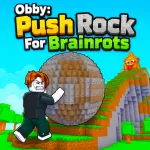
 Friday Night Funkin
 Escape Road 3
 Backrooms Craft
 Save the Doge
 8 Ball Pool Challenge
 Stumble Boys: Party Royale
 Retro Rush
 Red Ball
 Eaglercraft
 ASMR Tower: +1 Jump!
 Crazy Cattle 3D
 Obby: Steal an Egg - The Great Escape
 Ultimate Tower Defense
 +1 Speed Keyboard Lucky Escape
 Slope Rider
 +1 Web Swing Escape
 Obbi: The Legend of the Ring
 Ragdoll Sandbox